Keep selling when the internet drops
What keeps working offline
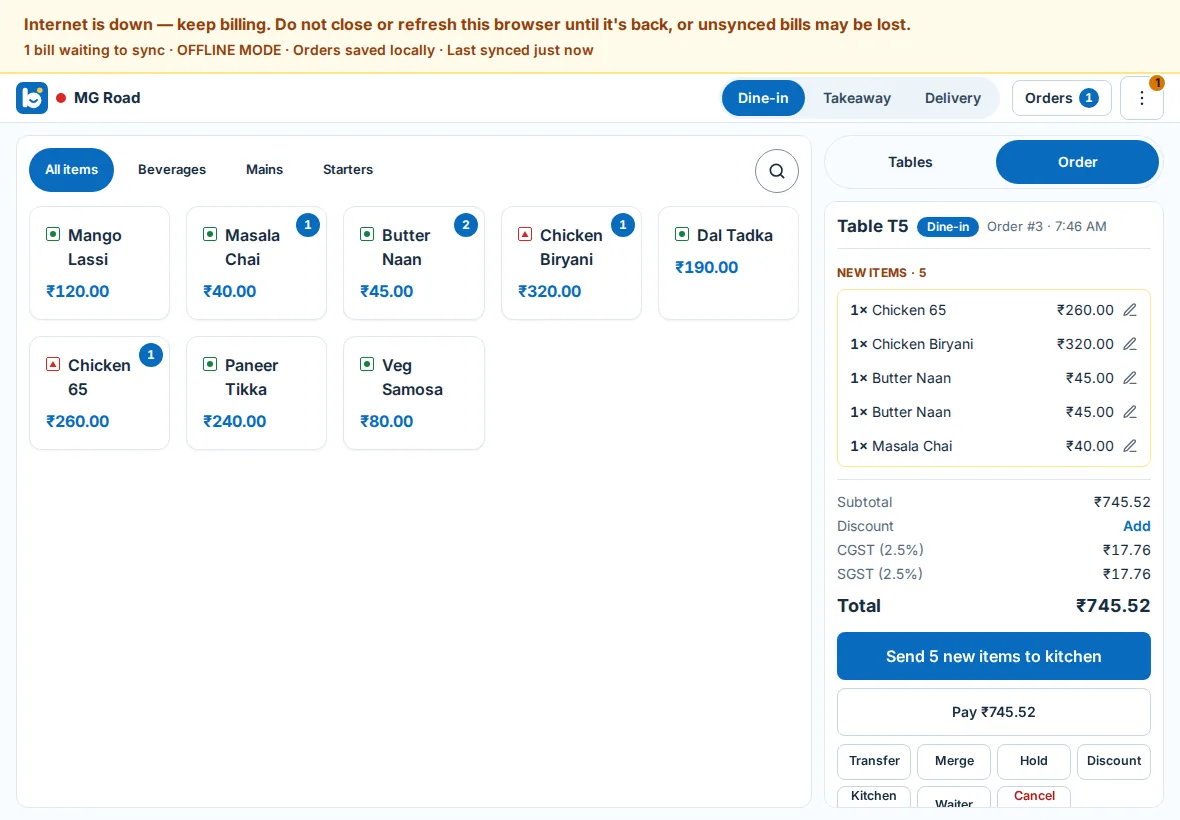
When the connection drops, the POS shows a banner — Internet is down, keep billing — and carries on. Staff can take dine-in, takeaway and delivery orders, change dishes not yet sent, send kitchen tickets, print the bill, open the cash drawer, take the whole bill in cash or record a card payment taken on your own card machine, and mark orders collected or delivered.
Before payment, Print Bill prints a provisional bill from the POS's own totals, clearly marked as not a tax invoice. BillDine issues the invoice when the order reaches it.
What waits for the connection
Anything that changes money after the fact waits until the POS is back online: cancelling a dish the kitchen already has, splitting a bill, moving a table, discounts, refunds and closing the cash drawer. The POS menu lists these under Internet is down, so staff know why a button is not there instead of guessing.
How long a POS terminal sells offline
A POS terminal that has been online recently keeps selling offline for up to 72 hours, unless the outlet sets a different window. A terminal that has never been online can't sell offline, because it has not yet downloaded the menu and prices.
A sale that reaches BillDine later than the window is never thrown away. It waits in Offline sync review as a late sale until a manager accepts it, and then counts on the business day it was taken.
Signing in during an outage
People who signed in on this POS terminal with their PIN within the offline window can still sign in while the internet is down; nobody else can until it is back. Too many wrong PINs offline lock that person out for a while. Each person's bills are kept on the device under their name, and when the connection returns the POS asks for their PIN once more before sending them.
Printing and the kitchen offline
The BillDine app prints by itself to Wi-Fi printers on its network and to Bluetooth printers paired to it, with or without the internet. If no printer is in reach, a sent order says Saved, prints when back online, and nothing is lost. With Kitchen screens over Wi-Fi when offline turned on, the POS passes new tickets to the outlet's kitchen screens over your own Wi-Fi.
When the internet comes back
The banner changes to Back online, syncing while bills are sent, then to All bills synced. If something can't simply be accepted, it waits in Offline sync review. A manager sees what the POS showed, what BillDine would bill, the cash collected and anything still owed, then records the difference or dismisses it with a note on what happened to the money. Nothing changes the books without a manager.
The day after an outage
After an outage, POS → Cash drawers shows a banner asking a manager to review what happened while the POS was offline. When you close the day, any offline sales still waiting for review are listed: accept or dismiss them, or close the day with a reason. A sale accepted later still counts on its own business day; if that day was already closed, its Z-report stays as it was and the next Z-report lists the sale as added after close.
App or browser
The BillDine app for Android phones and tablets is the sturdiest way to sell offline: it keeps the orders on the device and prints by itself. A browser paired as a POS terminal also keeps selling through an outage as long as its window stays open — don't close or refresh it until the connection is back. Take orders in a browser from your own sign-in works online only. The app and the browser are the same POS, with the same menu, prices, staff PINs and kitchen screens.
Questions
- Does BillDine work without the internet?
- The POS does. It keeps taking orders, sending kitchen tickets, printing bills and taking cash, and sends everything to BillDine when the connection returns.
- Can I take card payments while offline?
- BillDine records a card payment the guest makes on your own card machine. Whether that card machine works without the internet depends on the machine and your card provider.
- What if a sale reaches BillDine very late?
- It is never thrown away. It waits in Offline sync review until a manager accepts it, and then counts on the business day it was taken.
- Do I have to do anything when the internet comes back?
- No. The POS sends the bills by itself. A manager opens Offline sync review only when the POS says some offline orders need attention.
Learn it step by step
More features
Who it's for
Ready when you are
Create your account and go straight in: no set-up questions, and a few days of sample orders to explore. Your free trial starts when you sign in.
Setting up a POS terminal or kitchen screen? Use this device as a terminal