Customers and loyalty: remember your regulars and bring them back
A customer list that builds itself
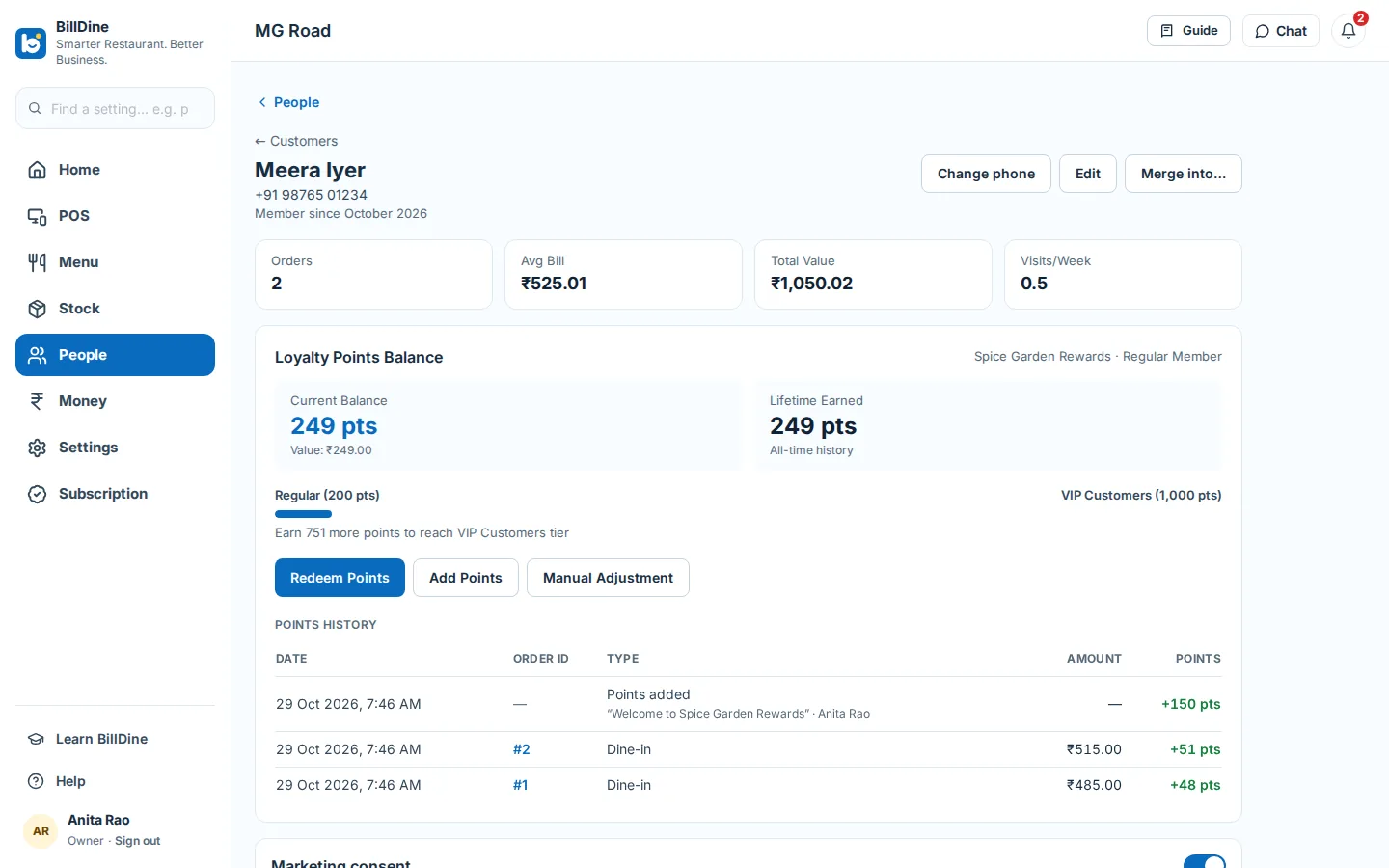
On an order, Add customer details finds a guest by phone or name, or adds a new one in a few taps. Each phone number belongs to one customer, so the list doesn't fill with copies, and a duplicate saved by mistake can be merged into the right customer with its orders and points. Each customer's page shows their order history, saved delivery addresses and loyalty points.
Coming from another system? Import your customer list from a spreadsheet saved as CSV. BillDine checks the whole file first and shows what it will add, skip or reject before anything is saved, and importing the same file twice adds nobody twice.
Finding a guest
In the back office, Customers lists every guest, with search by name, phone or email, and each guest's page shows their history, their points and anything they owe on account. Managers can also add points by hand — a welcome or a thank-you — with a reason that stays in the history.
Delivery addresses and contact details
A customer's delivery addresses are saved on their page, and the POS offers them when their number is typed on a delivery order; correcting an address never changes orders already placed. A phone number can be changed on the customer's page, keeping their orders and points, and numbers without a country code are read as numbers of your outlet's country.
Points that guests earn and spend
In People → Loyalty, switch on the program, give it a name and choose how many points each amount spent earns. Redemption rules set what a point is worth, the fewest points a guest may redeem and the most per order. Paid bills earn points on the dishes, after discounts and before tax.
At the POS, a guest spends points with Redeem on their bill, and the POS checks they have enough. Gave their number only after paying? The same day, Add customer on the paid bill still earns its points; the printed bill stays as it was.
Tiers for your best regulars
Loyalty tiers reward the guests who come most: each tier has a name, the lifetime points needed to reach it and its benefits, and the top tier is for your VIP customers. Guests move up as their lifetime points grow. A customer's page shows their points balance and tier at a glance, so staff can tell a regular what they have saved.
Every point on record
Points change only through recorded entries — earned on a bill, redeemed on a bill, or added, redeemed or adjusted by a manager — and each customer's points history lists them all. Staff can't quietly hand out points, and you can always see where a balance came from.
The bill on the guest's phone
Share bill sends a paid bill on WhatsApp, by email or as a link, with its PDF. The message and the bill page are in the bill's language, and the guest can switch it. Typed contact details are used once unless you choose to save them to the customer, and a shared link can be stopped at any time.
Regulars who pay later
For an office that settles weekly or a regular who pays at month end, the owner can turn on bills on account. The bill is a sale on the day with its tax, the customer owes the amount, and payments against the account are taken at the POS and kept apart from the day's sales.
Guests' privacy
Staff see only what their role allows: phone numbers can be masked and addresses hidden. Marketing consent is recorded only when the guest agrees, exports of the customer list are audited, and when a guest asks for their data or to be forgotten, an owner or a manager can do it from their page, and each request is logged.
Questions
- Does a guest need an app or a card to collect points?
- No. Points are kept against the guest's phone number; staff find them at the POS by number or name.
- Can I bring my existing customer list?
- Yes. Import it as a CSV file with a name and a phone number for each guest; BillDine shows what it will add and skip before saving anything.
- Can staff change a guest's points?
- Points are earned and redeemed on paid bills by themselves. Only managers can add or adjust points by hand, and every change is in the customer's points history.
- What if the same guest was saved twice?
- One phone number belongs to one customer. A copy saved under another number can be merged into the right customer, moving its orders, bookings, addresses and points.
Learn it step by step
More features
Who it's for
Ready when you are
Create your account and go straight in: no set-up questions, and a few days of sample orders to explore. Your free trial starts when you sign in.
Setting up a POS terminal or kitchen screen? Use this device as a terminal